AuthorizationCodeAuth authenticates your bot using a one-time authorization code from Epic Games.
Getting an Authorization Code
- Log into the Epic Games account using this link
- Copy the
authorizationCodevalue from the redirectUrl query parameters
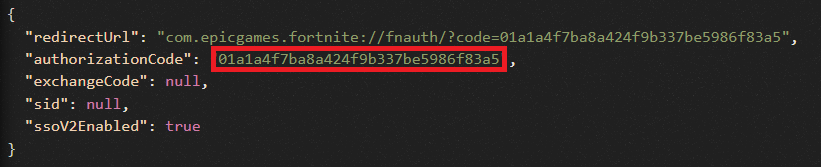
If you’re already logged in and want to change accounts, log out at https://www.epicgames.com first, then log in to the new account and generate a new code.
Basic Usage
Using a Function to Provide Code
You can pass a function or coroutine that returns the authorization code:Using an Async Function
Parameters
The authorization code or a function/coroutine that when called returns the authorization code.
A 32 character hex string representing your device. If not provided, one will be automatically generated.
The main Fortnite token to use with authentication. You should generally not need to set this manually.
The token type to use. It’s recommended you only change this if you know what you’re doing, as certain functions/API calls may start causing errors.
Attributes
The Authorization header for use with Fortnite endpoints. Use this if you’re making HTTP requests that aren’t already implemented.
The account ID of the authenticated user.
The resolved authorization code after calling any provided callable.
Important Notes
- Authorization codes expire after 5 minutes
- Each code can only be used once
- Not recommended for production use (use DeviceAuth instead)
- Best suited for testing and development
Common Errors
Invalid Authorization Code
If you receive anAuthException with the message “Invalid authorization code supplied”, the code has either:
- Already been used
- Expired (older than 5 minutes)
- Been copied incorrectly